


New article
Recently updated
Configuring gate, curfew, noise level and exclusion zone violation rules

Who is this article for?Noise analysts who need a parameter reference for gate, curfew, noise level and exclusion zone violation rules.
Access to the ANOMS Noise Analyst Workbench is required.
This article explains how to configure four types of violation rules in ANOMS: gate rules for track compliance, curfew rules for time restrictions, noise level rules for excessive noise events, and exclusion zone rules for restricted airspace.
Understanding gate rules
A gate rule creates a violation where an aircraft has, or has not, penetrated one or more selected gates. You can design gates that require an aircraft to penetrate all of them down a specific course (similar to a track rule), or the opposite, where a single gate or fence of gates must not be penetrated. Gate rules have also proved useful for detecting early turns in departures. The gates themselves must be created first.
Each gate in the rule can additionally carry altitude and speed requirements, for example a minimum or maximum altitude through the gate. This has been used successfully in strict noise abatement programmes on new runways where flight routes were over residential areas.
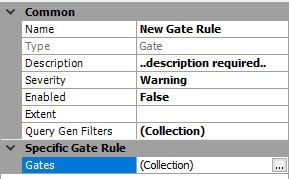
A Gate rule, with the Gates collection under Specific Gate Rule
Configuring gates in a gate rule
To configure the gates:
- In the rule's parameters, click the button to the right of the Gates collection line.
- Click Add to add a gate line.
- With the line highlighted, use the Gate drop-down to select the gate to be used in the rule.
- Define the required behaviour of the operation:
- Intersection — whether the operation must or must not intersect the gate.
- Direction — where In is in the direction of the arrow on the gate.
- Optionally, Height Min/Max (ft) and Ground Speed Min/Max (m/s) requirements for the passage through that gate.
- Add more gates with the Add button, and alter their order using the arrows to the right of the members list.
- Click OK.
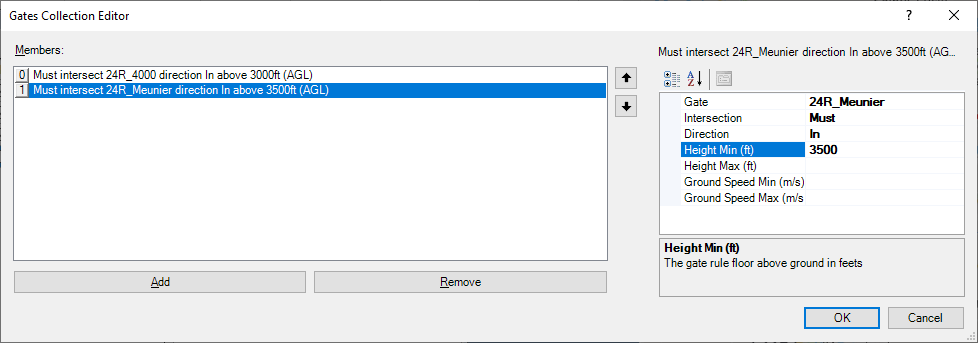
The Gates Collection Editor, with two gates that must be intersected above minimum heights
Similar to corridors, a succession of gates can be used to check very specific flight routines and compliance. You can continue to refine the rule to ensure aircraft have the best chance of compliance.
Understanding curfew rules
The curfew rule detects operations running during hours when they should not be operating, in most cases departures after a set evening time, though the parameters can vary. It is a unique rule type: a pre-built query acts as the selector, and the rule is set up simply by choosing that query.
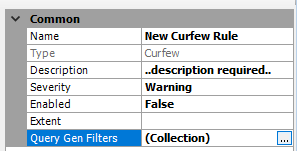
A Curfew rule; the query is attached through the Query Gen Filters collection
Building the curfew query
Build the query first, using the Query Generator. The query must satisfy strict requirements:
- It must use an interactive date selection parameter.
- It must be a Report output whose only output field is Operations.Operation Number.
- A second criteria line acts as the time filter, using a Period of Day covering the curfew hours, for example one named 2230-0530. This retains the required interactive criteria while the second filter selects operations only during the curfew period.
- A further criteria line can restrict the rule to departure operations, as is the case at many airports.
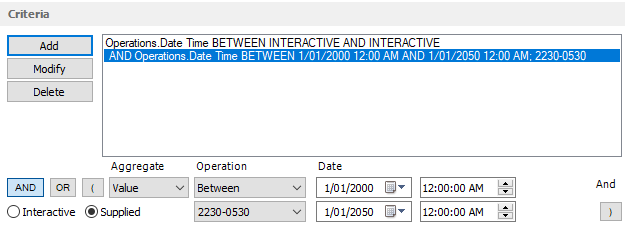
Curfew query criteria: an interactive date line plus a supplied Period of Day line for the 2230-0530 curfew
Note: The report output of Operation Number is used internally by the Violations Browser to link the violation record to the actual operation and populate the browser with full violation and operation details. This linking is different from the standard correlation numbers that link noise and complaints.
Attaching the query to the curfew rule
To attach the query to the rule:
- In the rule's parameters, click the button to the right of the Query Gen Filters line.
- Click Add to add a new line.
- Select the query from the drop-down menu on the right.
- Click OK.
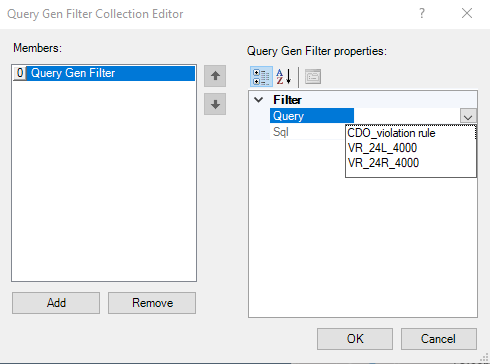
The Query Gen Filter Collection Editor, with the drop-down listing only the qualifying queries
Note: The menu is filtered, showing only the queries that qualify for use as part of a violation rule. If your query does not appear, check it against the requirements above to troubleshoot.
Understanding noise level rules
Noise level rules trigger a violation when an aircraft creates a noise event with an extreme dB level. You define, using a query, what constitutes a noise event Lmax that is too loud. The query is constructed in the same way as other rule queries, with one key difference: instead of outputting an Operation Number, a noise level query must output an Event ID, from the Noise table.
Understanding exclusion zone rules
An exclusion zone rule generates a violation when an operation penetrates a pre-made selection zone. The zone must already have been set up through the Feature Manager on the map.
In the rule's parameters, simply select the zone from the Exclusion Zone drop-down menu; aircraft penetrating that zone then qualify as violations.
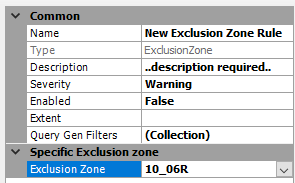
An Exclusion Zone rule, with the pre-made selection zone chosen from the drop-down