


New article
Recently updated
Testing violation rules with historical processing

Who is this article for?Noise analysts who want to test a violation rule against historical flights before enabling it.
Access to the ANOMS Noise Analyst Workbench is required.
When a violation rule is created or changed, its effects are normally only observable after overnight processing. Historical processing lets you run a rule against past data straight away, so you can check whether it catches the intended operations and refine it before relying on it.
Running historical processing on a rule
To test your violation rule against historical data:
- From the Main Menu, select Data.
- Select Violation Rules Manager, or continue with the rule you have just created and saved.
- Select the rule.
- Click the Run button.
- In the Violation Rule Period window, select the Start at date using the calendar drop-down.
- Select the End at date using the calendar drop-down.
- Click OK to begin processing.
- Wait for the completion message to appear (depending on the length of the period chosen, this may take some time).
- Once complete, use the Violations Browser to search for the new violations (see Managing violation records).
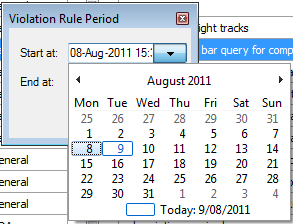
The Violation Rule Period window, where you choose the date range to reprocess
Refining the rule
If the rule catches too many, too few, or the wrong operations, you can adjust it.
To refine your violation rule:
- Edit the rule parameters in the Violation Rules Manager.
- Save the rule.
- Run historical processing again over the same period.
- Repeat until the rule identifies exactly the operations you intend.
Note: Editing a rule only affects future nightly processing. Violations already recorded in the historical data are not corrected until you re-run historical processing over that period.