


New article
Recently updated
Measuring compliance with pre-filtering queries

Who is this article for?Noise analysts who need to report percentage compliance against violation rules.
Access to the ANOMS Noise Analyst Workbench is required.
Pre-filtering queries allow a violation rule to mark every operation it considered, not just those that violated, enabling you to report the percentage of operations that complied with a procedure.
Understanding how pre-filtering works
A pre-filtering query is a Query Generator report attached to a rule through its Query Gen Filters collection. All operations funnelled through the query become violation candidates for that rule and then, based on whether they actually violated it, a Y or N is applied to the Violations Candidate database column. Where more than one filter query is attached, they are combined with a logical AND.
An example pre-filtering query could be all departures, or departures using a specific runway. Once the system can identify all operations that were candidates for the violation, counts can be used to tally percentage compliance for that rule.
Setting up a pre-filtering query
To configure a pre-filtering query:
- Build the query in the Query Generator (see Building, saving and running a Query Generator report). To qualify for pre-filtering, the query must use an interactive operation date selection parameter and be a Report output whose only output field is Operations.Operation Number.
- Open the Violation Rules Manager and select the rule.
- Open the Query Gen Filters collection.
- Click Add.
- Select your query from the drop-down. Only queries meeting the conditions in step 1 appear in the list; if your query is missing, use those conditions to troubleshoot it.
- Save the rule.
Note: From the next nightly processing run, candidate operations are stamped with the Violations Candidate Y/N value. To stamp past data, run historical processing (see Testing violation rules with historical processing).
Reporting on percentage compliance
The candidate data is available to the Query Generator through the Violation Candidate relation of the ANOMS datasource, which offers the Operation Number, Rule Name and Is Violation (Y/N) fields.
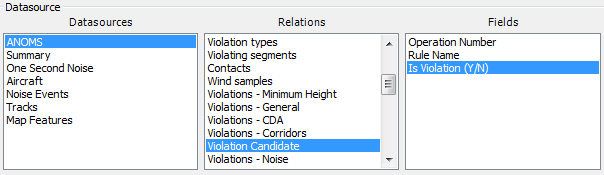
The Violation Candidate relation in the Query Generator, with the Operation Number, Rule Name and Is Violation (Y/N) fields
Build a query over this relation to count candidates and violations for a rule; the ratio of N results to total candidates gives the percentage compliance with that procedure at your airport.