


New article
Recently updated
Creating a query for use with the Update Rules Manager

Who is this article for?ANOMS administrators who need to build a query that qualifies for the Update Rules Manager.
Administrator access to the ANOMS Noise Analyst Workbench is required.
The Update Rules Manager only lists queries that meet strict eligibility criteria, and a badly formed query can cause serious damage when used to update data.
Understanding query eligibility criteria
Queries used with the Update Rules Manager must meet all of the following criteria:
- The query must be a Report query
- The date range must be Between INTERACTIVE and INTERACTIVE
- The query must output one field only — logically, "Select (one field only) from (normal SQL statement)"
- The output field must be the key number of the record type to be modified: for operations, Operations.Operation Number; for Noise Events, Noise.EventNum
- The query must be saved as Public
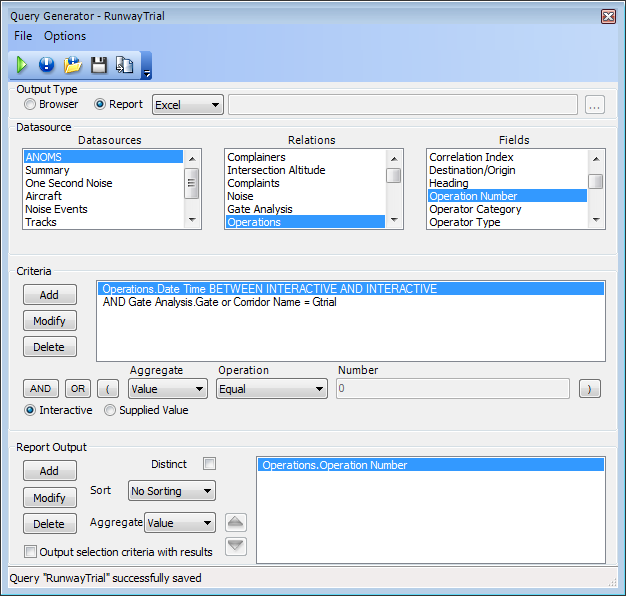
An eligible Report query — interactive date range, gate criteria, and a single output field of Operations.Operation Number
Ensure the query is saved. The Update Rules Manager identifies eligible queries based on these criteria.
Bracketing OR statements
Important: OR statements must be contained by brackets. An OR statement outside brackets will ignore any time or date parameters and can potentially alter the database completely.
Because an unbracketed OR clause bypasses the date range, an update rule using such a query could rewrite matching records across the entire database rather than just the intended period. Always check the criteria logic before saving a query intended for the Update Rules Manager.
Troubleshooting missing queries
If your query does not appear in the query drop-down in the Update Rules Manager, one or more of the eligibility criteria has not been met.
To verify your query meets the requirements:
- Re-open the query.
- Confirm it is a Report query.
- Verify it uses an Interactive-to-Interactive date range.
- Check it outputs only the single record-key field.
- Ensure it is saved as Public.