


New article
Recently updated
Understanding RMT noise monitor parameter settings (EMU and Smart Mic)

Who is this article for?ANOMS administrators who need a reference for analyser parameters (EMU and Smart Mic).
Administrator access to the ANOMS Noise Analyst Workbench is required. Available parameters depend on the analyser type.
The settings inside a noise monitor — thresholds, calibration times, event durations and more — are configured from the RMT Editor in an analyser-specific parameters window.
Displaying the parameters window
To access the parameters window:
- In the RMT Editor, select the monitor.
- Click Params.
The parameters window for that analyser type appears.
Note: Each RMT type has its own specific parameters window. For details on each window, refer to the online Help.
The displayed settings indicate acceptable values and thresholds. They may need tuning depending on the location of the RMT — contact Ideagen support to ensure accuracy.
Important: Data may be lost by changing any of these parameters during the day. Update parameters at the end of a day to avoid possible loss of data.
Understanding RMT EMU parameters
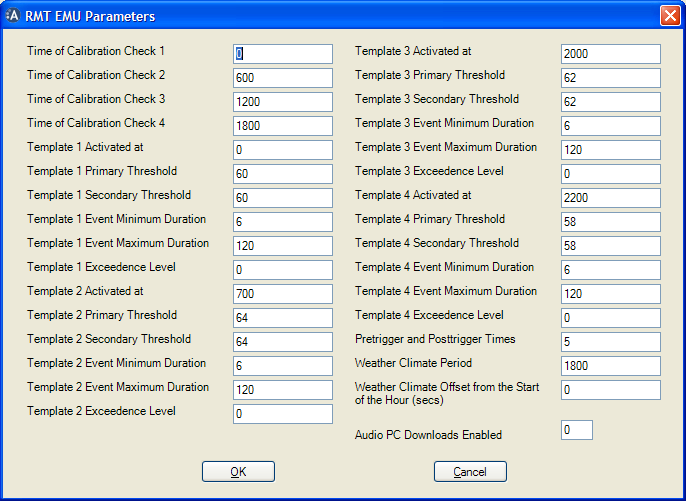
The RMT EMU Parameters window
Parameter | Definition |
Time of Calibration Check 1 | Time of the 1st calibration check of the electrostatic actuator (CIC) |
Time of Calibration Check 2 | Time of the 2nd calibration check of the electrostatic actuator (CIC) |
Time of Calibration Check 3 | Time of the 3rd calibration check of the electrostatic actuator (CIC) |
Time of Calibration Check 4 | Time of the 4th calibration check of the electrostatic actuator (CIC) |
Template 1 Activated at | Time template 1 is activated (the same descriptions apply for templates 2, 3 and 4) |
Template 1 Primary Threshold | Primary threshold defined in template 1 |
Template 1 Secondary Threshold | Secondary threshold defined in template 1 |
Template 1 Event Minimum Duration | Minimum duration of the noise event (seconds) defined in template 1 |
Template 1 Event Maximum Duration | Maximum duration of the noise event (seconds) defined in template 1 |
Template 1 Exceedance Level | Statistical exceedance levels L1, L5, L10, L50, L90, L95, L99 defined in template 1 |
Pretrigger and Posttrigger Times | The number of seconds before and after a noise event for which the EMU should store sample data, as part of the noise event |
Weather Climate Period | Defines a measurement period in seconds; weather climates are generated regularly with this period. For example, 3600 seconds gives an hourly weather climate |
Weather Climate Offset from the Start of the Hour (secs) | Offsets the start of weather climate measurements forwards or backwards, in seconds. For example, -300 causes all weather climates to start and finish 5 minutes earlier than expected: hourly weather climates for a day would start at 00:55, 01:55, 02:55 and so on |
Audio PC Downloads Enabled | Enables the downloading of real-time audio recordings of events to an Audio PC |
Understanding RMT Smart Mic parameters
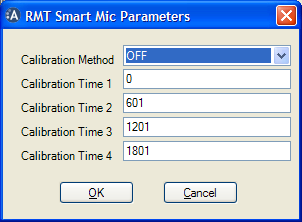
The RMT Smart Mic Parameters window
Parameter | Definition |
Calibration Method | The method used to calibrate the smart microphone. Values: Off, Check, Piston, Change |
Calibration Time | The time at which the Smart Mic performs a calibration |
Understanding other analyser types
For LD870, BK4435 and BK3639 (A, B, G, E) monitors, the parameters windows reflect the settings of the specific instrument — refer to the relevant operator's handbook for details of those parameters.