


New article
Recently updated
Understanding CIC calibration checks

Who is this article for?ANOMS administrators who want to understand automatic CIC calibration checks and fault alerts.
Administrator access to the ANOMS Noise Analyst Workbench is required.
A CIC calibration check is an automatic self-check of a noise monitor that verifies the microphone is still reading accurately.
Understanding what a CIC check is
For each monitor type, you can specify the times of the CIC calibration checks. A CIC is a self-check of the monitor in which an actuator sends a charged signal up to the head of the microphone, where it should read an expected dB level.
This method is inferior to a pistonphone check, but it can be done daily and alerts you to gross error margins.
Evaluating results
The system collects the result of each CIC and checks for any drift, then determines whether the check has passed or failed. If the difference between the Expected and Actual CIC result is more than 0.5 dB, the system flags the check as failed.
A failed CIC check automatically raises a fault ticket for investigation, so that the unit can be repaired or replaced.
The results are stored and can be viewed in the Daily Noise report, which shows the Expected and Actual CIC values, plus the background noise levels before and after each check.
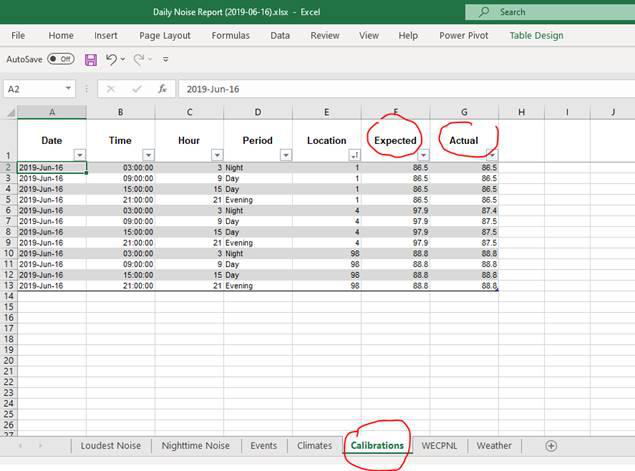
Example Calibrations sheet from a Daily Noise report, showing the Expected and Actual CIC results per monitor
Scheduling CIC checks
The CIC can be configured to run up to four times per day. Scheduling is done in the RMT Editor (in the analyser parameters window opened with the Params button) and can be set for any time of day.
- Pick a quiet time of day: the CIC will not initiate if the monitor is in the middle of recording a noise event
Note: Data may be lost by changing monitor parameters during the day. Make parameter updates at the end of a day to avoid possible loss of data.