


New article
Recently updated
Configuring RMT general parameters

Who is this article for?ANOMS administrators who need to configure RMT communication settings.
Administrator access to the ANOMS Noise Analyst Workbench is required.
The RMT General Parameters window holds the general settings and information for a noise monitor, including its descriptions, state, communication phone numbers, serial numbers and baud rate.
Configuring RMT general parameters
To configure the RMT general parameters:
- In the RMT Editor, select the monitor and click General RMT.
- In the Brief box, type a brief description.
- In the Description box, type the full description.
- In the State list, select the required state.
- If the RMT collects weather data, in the Weather list, select Yes.
- In the Microphone list, select the required microphone.
- In the Phone Number box, type the dial-up number.
- In the Audio Phone Number box, type the dial-up number for audio.
- In the Microphone Serial No box, type the serial number.
- In the Baud Rate list, select the baud rate.
- Click OK.
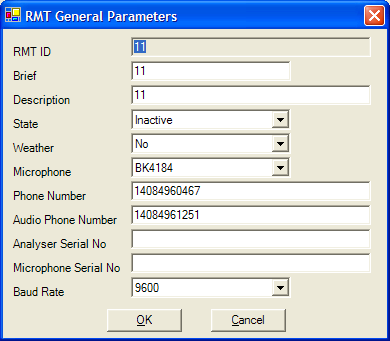
The RMT General Parameters window
Note: The first field, RMT ID, cannot be changed here and is displayed in grey text. This number is entered only when creating a new noise monitor.
Understanding RMT general parameters
The following table describes each parameter in the RMT General Parameters window:
Parameter | Definition |
RMT ID | Unique number assigned to the noise monitor |
Brief | Brief description of the noise monitor |
Description | Description of the noise monitor |
State | Status of the noise monitor (Active or Inactive) |
Weather | Whether the monitor is able to collect weather data (Yes or No) |
Microphone | Microphone type (model number) |
Phone Number | Phone number used for data communication |
Leased Line Port | Port the RMT connects through |
Analyser Serial No | Serial number of the analyser |
Microphone Serial No | Serial number of the microphone |
Baud Rate | Communication speed setting |