


New article
Recently updated
Using the RMT Editor

Who is this article for?ANOMS administrators who need a reference for the RMT Editor window and commands.
Administrator access to the ANOMS Noise Analyst Workbench is required.
The RMT Editor maintains the list of noise monitoring equipment (RMTs) and their assigned Locations, and provides access to parameter and communication settings for each monitor.
Understanding what you can do with the RMT Editor
Use the RMT Editor to perform the following tasks:
- Create new noise monitors and Locations
- Configure noise monitor and Location parameters
- Assign a noise monitor to a Location
Opening the RMT Editor
To access the RMT Editor:
- From the Input menu, click Manage RMT.
The RMT Editor window appears. Use the top list (the Noise Monitor Data area) to add and maintain RMTs, and the lower list (the Location Data area) to add and maintain Locations.
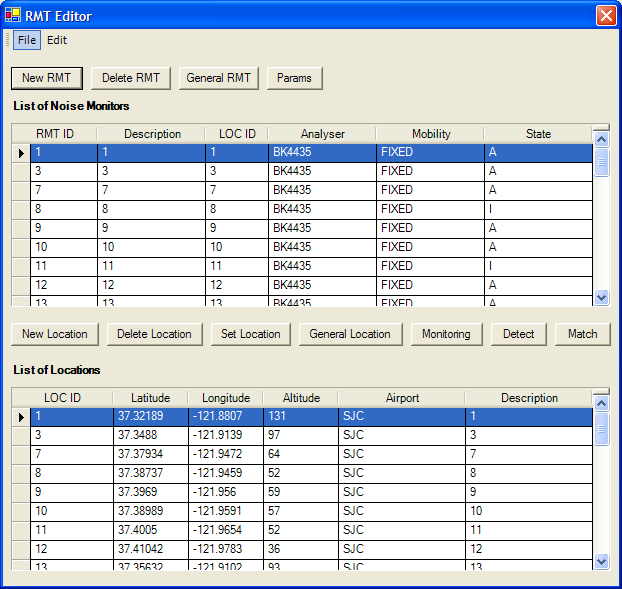
The RMT Editor window, with the Noise Monitor Data area (top list) and the Location Data area (lower list)
Working with the Noise Monitor Data area
The Noise Monitor Data area displays the list of existing noise monitors, together with its own monitor-related command buttons.
RMT commands
Command | Definition |
New RMT | Creates a new noise monitor |
Delete RMT | Deletes an RMT |
General RMT | Opens a dialogue box to configure RMT General Parameters |
Params | Opens a dialogue box to configure RMT Analyser Parameters |
Noise monitor data fields
Field | Example | Description |
RMT ID | 1 | Number assigned to the noise monitor equipment |
Description | 220 Main St | Description of the noise monitor |
Loc ID | 1 | Location ID number that the RMT is associated with |
Analyser | LD870 | Model name of the noise monitor |
Mobility | Fixed | Mobility of the noise monitor (Fixed or Portable) |
State | A | Status of the noise monitor (Active or Inactive) |
Working with the Location Data area
The Location Data area displays the list of user-created Locations, together with Location-related command buttons.
Location commands
Command | Definition |
New Location | Creates a new Location |
Delete Location | Deletes the selected Location |
Set Location | Assigns a Location to a noise monitor |
General Location | Configures Location General Parameters |
Monitoring | Configures Location Monitoring Parameters |
Detect | Configures Location Detection Parameters |
Match | Configures Noise-to-Track Match Parameters |
Location data fields
Field | Example | Description |
Loc ID | 1 | Unique number assigned to a Location |
Airport | ORD | Airport associated with this Location (three-letter code) |
Description | 220 Main St | Description of the Location |
Latitude | 41.970780 | Latitude of the Location, in decimal degrees |
Longitude | -87.808632 | Longitude of the Location, in decimal degrees |
Altitude | 500 | Altitude of the Location, in feet above sea level |