


New article
Recently updated
Creating a new location in the RMT Editor

Who is this article for?ANOMS administrators who need to add a new monitoring Location.
Administrator access to the ANOMS Noise Analyst Workbench is required.
A Location is the actual address where fixed and portable noise monitors can be set up to collect data.
Creating a new location
To create a new Location:
- In the RMT Editor window, click New Location.
- In the Location ID field, type a unique number.
- In the Latitude box, type the latitude in decimal degrees.
- In the Longitude box, type the longitude in decimal degrees.
- In the Altitude box, type a value in feet.
- In the Local Airport ID list, select the required airport.
- In the Description box, type text that will be displayed in the map layer.
- In the Brief Description box, type a more detailed description.
- Click OK to save.
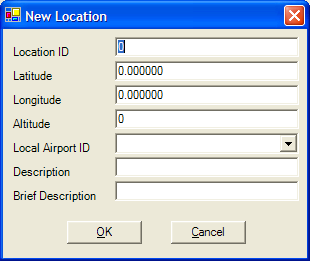
The New Location window