


New article
Recently updated
Merging duplicate caller records with Caller Replace

Who is this article for?Noise office staff who need to merge duplicate caller records into one.
Access to the ANOMS Noise Analyst Workbench is required.
The Caller Replace feature allows you to consolidate multiple caller records for the same resident into a single, correctly entered record.
Understanding the Caller Replace window
Over time, the same resident can accumulate several caller records due to misspelled names, old addresses, or duplicate entries. The Caller Replace feature in the Complaint Editor helps you replace incorrect or misspelled instances with one correct record.
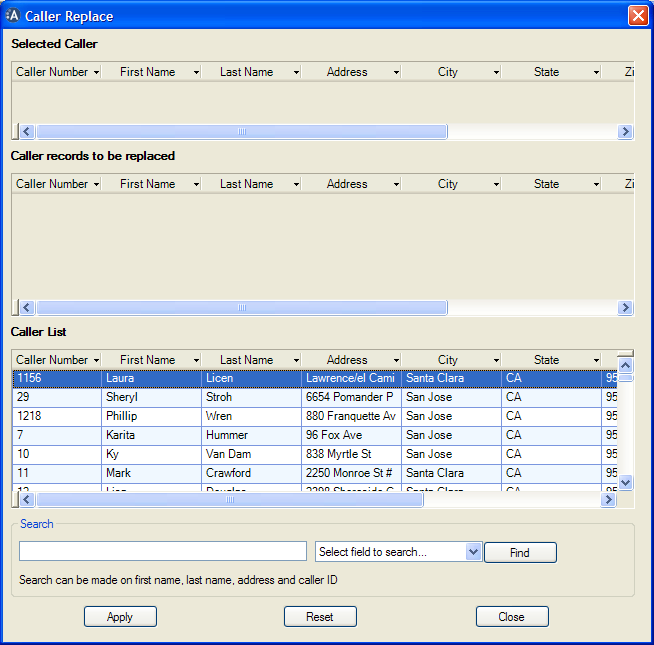
The Caller Replace window: Selected Caller (the correct record), Caller records to be replaced, and the full Caller List
The window has three areas:
- Selected Caller — the caller record that is correct
- Caller records to be replaced — the incorrect records that will be merged into the correct one
- Caller List — all callers in the system, or the callers returned by your search
Note: When the Caller Replace window first appears, the Caller List displays all of the callers that have been entered into the system.
Replacing caller records
To merge duplicate caller records:
- From Complaints Properties, click Caller Replace.
- In the Search box, type the search value for one of the following: First Name, Last Name, Address, or Caller ID.
- In the Select field to search list, select the search field.
- Click Find.
- In the Caller List, select the correctly entered record.
- Drag it to the Selected Caller list.
- In the Caller List, select each incorrect record.
- Drag it to the Caller records to be replaced list.
- Click Apply to replace the incorrect caller records with the selected correct record.
- When the confirmation dialogue box appears, click Yes to make the changes, or No to cancel.
Tip: Sort the field you are searching by to group your results — this makes duplicates much easier to spot.
If a match is found, the record is highlighted in the Caller List. Continue clicking Find to highlight the next matching record. If no matches are found, the computer beeps and a dialogue box appears.
Clearing the caller lists
To clear the records from the Selected Caller and Caller records to be replaced lists:
- Click Reset.