


New article
Recently updated
Replaying flight tracks and noise events

Who is this article for?Noise analysts who need to replay flight movements and noise events.
Access to the ANOMS Noise Analyst Workbench is required.
The Replay window extracts and plays back flight track operations and noise events for a user-defined period, allowing you to view flight tracks, aircraft details, and noise events at each noise monitoring terminal (NMT/RMT).
Understanding replay capabilities
During replay, you can view flight tracks, aircraft details, and noise events at each noise monitoring terminal. If your system has ATC recording enabled, you can also hear the ATC audio during the replay, as long as the replay is running at normal (1x) speed.
Note: You cannot replay flight tracks from the Operations Browser — Replay loads its own data.
Replaying flight tracks
To replay flight tracks:
- In the Map Browser toolbar, click Replay.
- Click New Query or Open Query to populate the replay.
- To enable ATC playback (if available), click the ATC playback (headset) button on the Replay toolbar.
- To start the replay, click Replay.
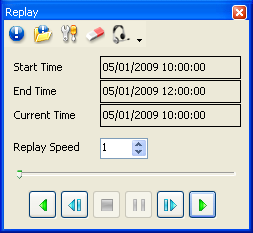
The Replay dialogue box with time range, replay speed, and transport controls
Note: Replay uses the Load Filtered Data dialogue box (the standard ANOMS query dialogue) to extract and load data.
Changing the replay properties
To change the replay properties:
- From the Replay toolbar, click Properties.
- Select the required Tag item check boxes.
- In the Tail Length box, type a value.
- Click OK.
Note: The Tail Length determines how much of the track remains visible on the Map Browser behind each aircraft.
Controlling the replay
Use the Replay transport controls to play, pause, step, and change the speed of the replay.
Control | What it does |
Play Backwards | Plays the replay backwards |
Step Back | Steps back in one second increments |
Stop | Stops the replay |
Pause | Pauses the replay |
Step Forward | Steps forward in one second increments |
Play | Plays the replay forwards |
Time slider | Drag left or right to go to a specific time, as indicated in the Current Time box |
Replay Speed | Changes the play speed of the replay. When set to one, the replay runs in real time |
Note: ATC audio only plays when the replay speed is set to one (real time).