


New article
Recently updated
Understanding how correlation works in ANOMS

Who is this article for?Noise analysts who want to understand Correlation IDs and how ANOMS links events.
Access to the ANOMS Noise Analyst Workbench is required.
ANOMS automatically correlates operations to noise events and complaints using matching algorithms, assigning Correlation ID numbers to link related records.
Understanding Correlation IDs
When ANOMS creates a link between records, it assigns a Correlation ID number to relate them. For example, if a noise event has a Correlation ID, the flight operation or track that caused the noise event receives the same Correlation ID.
Note: Records with a Correlation ID of zero are not linked to any other records. A Correlation ID greater than zero means the record is linked to other records.
You can add or modify correlations manually when needed. For detailed instructions, see the articles Manually linking a noise event to an operation, Unlinking or reclassifying a noise event, and Linking and unlinking complaints and operations.
Understanding basic terminology
- Noise Events — the Correlation ID identifies noise events linked to operations. Noise events at different RMTs can link to the same operation, but each noise event is correlated to a single operation
- Complaints — the Correlation ID identifies complaints linked to an operation. Multiple complaints can be linked to the same operation
- Operations — an operation is linked to noise events, complaints, or both, as identified by the Correlation ID. Multiple operations cannot have the same Correlation ID
Editing Correlation IDs and noise event classification
ANOMS follows strict rules when editing Correlation IDs and classifications. The system allows only certain editing actions, depending on the noise event, complaint, or operation selected in the browser lists. You control editing from the Correlate Operations, Complaints and Noise Events dialogue box (the Edit Action window), where actions that are not valid for your current selection are unavailable.
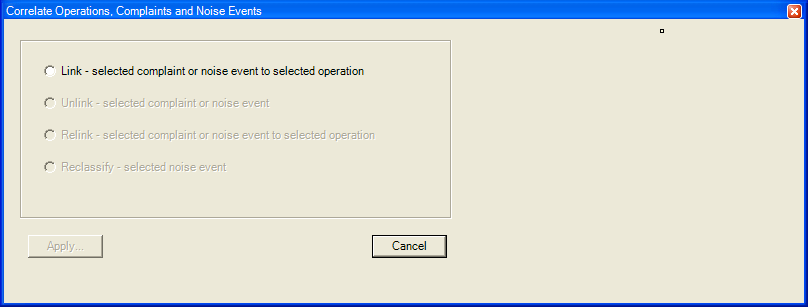
The Correlate Operations, Complaints and Noise Events dialogue box, with only the Link action available for the current selection
Edit Action | Definition |
Link | Links the selected complaint or noise event to the selected operation. Select a noise event or complaint with a Correlation ID of zero, and select an operation. Click the Link option, then click Apply. The Event Editor appears so you can classify the event. |
Unlink | Unlinks the selected complaint or noise event. Select a complaint or noise event with a Correlation ID greater than zero; do not select an operation. Click the Unlink option, then click Apply. The Event Editor appears so you can reclassify the event. |
Re-link | Links the selected complaint or noise event to the selected operation, replacing an existing link. Re-link works the same way as Link, except that it is only available when the complaint or noise event already has a link (its Correlation ID is greater than zero). |
Reclassify | Changes the classification of the selected noise event without changing its link. This option is only available when a noise event alone is selected. Click the Reclassify option, then click Apply. |
Note: If both complaints and noise events are selected, you cannot perform correlation management.