


New article
Recently updated
Using Query Generator with worked examples

Who is this article for?Noise analysts who want worked examples of common Query Generator reports.
Access to the ANOMS Noise Analyst Workbench is required.
This article provides worked examples of common Query Generator reports, demonstrating how to list data from single and multiple relations, use counts and aggregates, and apply complex criteria with Or operators and parentheses.
Listing data from one relation
This query lists noise event data for a time period at noise monitors 1, 9 and 13, illustrating interactive values, the In operator, and ascending sorts in the output.
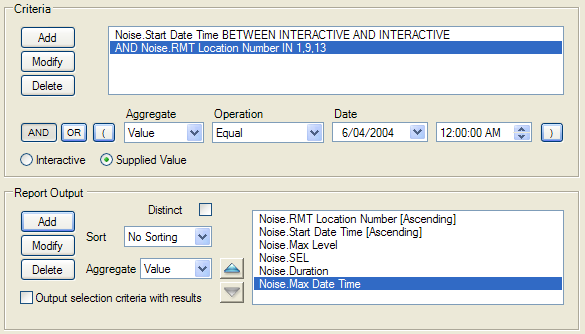
Example A criteria and output: Start Date Time between two Interactive values, RMT Location Number In 1,9,13, with the output sorted ascending by location and start time
The criteria statements are:
- Noise.Start Date Time BETWEEN INTERACTIVE AND INTERACTIVE
- AND Noise.RMT Location Number IN 1,9,13
The print fields are RMT Location Number (ascending), Start Date Time (ascending), Max Level, SEL, Duration and Max Date Time.
Points to note:
- The interactive date time allows the report to be run for different time periods without editing the query
- The In statement for the monitor numbers shows how to enter non-consecutive values of a field
- Each print field creates a column, and the data for each event fills a row in the table
- The ascending sort on RMT Location Number and Start Date Time groups all the data from monitor 1 before monitor 9, with each monitor's events listed in the order they occurred
Listing data from multiple relations
This query lists aircraft noise events in chronological order, combining two relations: noise events and flight operations. The relations are linked by the Correlation ID, and this linkage is transparent — you do not enter it in the criteria. The query prompts for a period, then lists all aircraft noise events and the aircraft that caused them. A noise event must have a correlation ID to be selected and printed.
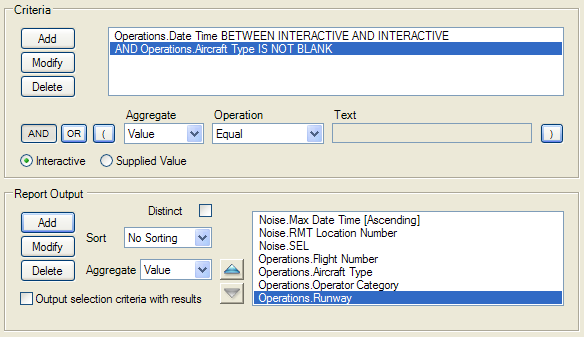
Example B criteria and output: an Interactive date range plus Aircraft Type IS NOT BLANK, printing both noise fields and operation fields
The criteria statements are:
- Operations.Date Time BETWEEN INTERACTIVE AND INTERACTIVE
- AND Operations.Aircraft Type IS NOT BLANK
The Is Not Blank operator means records must have an aircraft type to be listed — this restricts the output to aircraft-caused events. The print fields mix both relations: Noise.Max Date Time (ascending), Noise.RMT Location Number, Noise.SEL, Operations.Flight Number, Operations.Aircraft Type, Operations.Operator Category and Operations.Runway.
Using counts and aggregates
This query shows how to report attributes other than values stored directly in the database. At a single noise monitor, the noise events are counted for each aircraft type, alongside statistical values: minimum, maximum and average altitude at the point of closest approach (PCA), and maximum SEL.
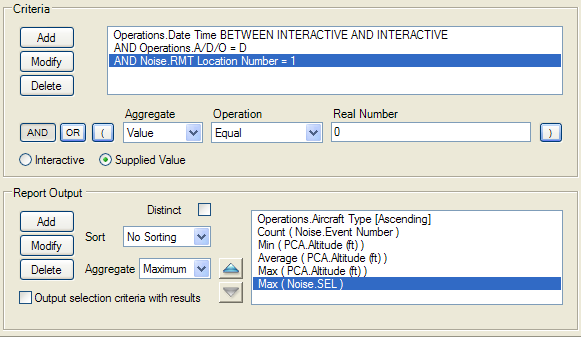
Example C criteria and output: departures at monitor 1 for an Interactive period, with Count, Min, Average and Max aggregates in the print fields
The criteria statements are:
- Operations.Date Time BETWEEN INTERACTIVE AND INTERACTIVE
- AND Operations.A/D/O = D
- AND Noise.RMT Location Number = 1
The print fields are Operations.Aircraft Type (ascending), Count (Noise.Event Number), Min (PCA.Altitude), Average (PCA.Altitude), Max (PCA.Altitude) and Max (Noise.SEL). Example output:
Aircraft Type | Number of Noise Events | Minimum Altitude | Maximum Altitude | Average Altitude | Maximum SEL |
B727 | 18 | 1966 | 3587 | 2583 | 99.6 |
B737 | 14 | 2848 | 3862 | 3330 | 89.8 |
B73S | 7 | 3400 | 4305 | 3777 | 83.5 |
B747 | 5 | 1717 | 2356 | 2003 | 95.4 |
Reading the first row: for B727 aircraft there were 18 noise events at monitor 1; across those events the average altitude over the monitor was 2583 and the maximum SEL was 99.6 dB.
Note: The count is of the noise event number. Because it is the number of noise events being counted, counting any field in the noise event relation — for example Count (SEL) — would give the same answer.
Using Or and parentheses
This query selects AAL and UAL departures on runway 32L, and AAL and UAL arrivals on runways 27L, 27R and 22L. The Or join is required because the query looks for operations that are arrivals or departures — an operation cannot be both, so And would return nothing.
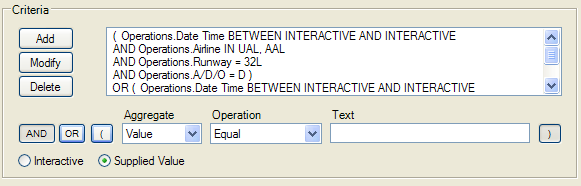
Example D criteria: two parenthesised groups joined by OR — departures on 32L, and arrivals on the 27L, 27R and 22L runways, each with its own date and airline statements
The parentheses group the statements into two sets: runway 32L with departures, and runways 27L, 27R and 22L with arrivals. The date-time and airline statements are repeated inside each group to ensure the query selects exactly the data required — repeating them is the safe approach.
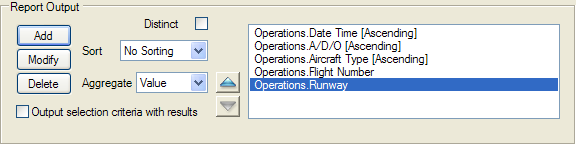
Example D print fields: Date Time, A/D/O and Aircraft Type sorted ascending, plus Flight Number and Runway
The print fields are Operations.Date Time (ascending), Operations.A/D/O (ascending), Operations.Aircraft Type (ascending), Operations.Flight Number and Operations.Runway.