


New article
Recently updated
Using interactive and supplied values in Query Generator queries

Who is this article for?Noise analysts who need queries that prompt for values at run time or use stored values.
Access to the ANOMS Noise Analyst Workbench is required.
Every value in a Query Generator criteria statement is either Supplied (stored with the query) or Interactive (requested from the user at run time), and choosing the right mode makes a saved query reusable.
Understanding supplied values
Supplied values are stored with the query, so the same value is always searched for. For example, a criteria statement with a Supplied value for aircraft type would always search for the same type, such as B727. Supplied is the default setting, and is useful for values that do not change over time.
Understanding interactive values
Interactive values are entered fresh each time the query runs. When you run a query containing an Interactive value, a Query Parameters dialogue box appears prompting you for the new values. For example, if the aircraft type criteria is set to Interactive, you enter an aircraft type every time the query runs. Interactive values are useful for reports that are run routinely, such as date ranges.
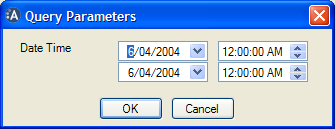
The Query Parameters dialogue box prompts for Interactive values, such as a date-time range, each time the query runs
Both options can be applied separately to different criteria statements within the same query.
Term | Definition |
Interactive | Value supplied by the user when the query is run; useful for reports that are run routinely |
Supplied Value | Entered with the query; useful for values that do not change over time |
Entering supplied values
When entering values in the value box:
- Use the % character as a wildcard where any value is accepted (for example, Aircraft Like B7%)
- To define a text value containing spaces, place quotation marks around the whole text (for example, "505 South Street")
- Separate the values in In and Not In statements with commas (for example, 27R,32L,4L)