


New article
Recently updated
Choosing output options for Query Generator results

Who is this article for?Noise analysts who need to send query results to Excel, a report template or CSV.
Access to the ANOMS Noise Analyst Workbench is required.
Report queries in the Query Generator can send their results to a plain Excel workbook, to a pre-formatted Excel report template, or to a CSV file.
Selecting the output format
To choose your output format:
- In the Options menu, click Output Options, or click Output Options on the Query Name toolbar.
- Select either Microsoft Excel Workbook or Report Template.
- If you selected Report Template, click Browse.
- Locate the template file.
- Click Open.
- Click OK.
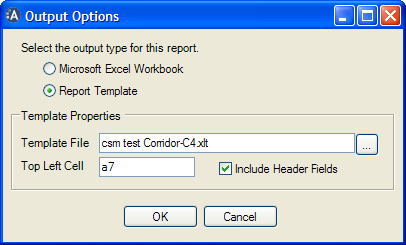
The Output Options dialog box, with the Report Template option selected and a template file chosen in the Template Properties group
Note: The Template Properties group is unavailable while the Workbook option is selected.
Using Excel workbook output
The query results are sent directly to a standard Excel workbook, with one column per print field. This is the quickest way to get raw data out of ANOMS for ad-hoc analysis.
Using Excel report template output
The results are merged into a pre-defined Excel template formatted to your requirements. Because ANOMS can combine a template with other Excel functions (such as pivot tables), a template gives you a ready-made report with formatted data and charts. Combined with the Task Bar, a single click can run the query, export the data and produce the finished report.
Note: Place custom templates in the directory anoms/data/excel_spreadsheets — ANOMS looks in this directory first when the template option is chosen.
Using CSV file output
The Query Generator can also output to a standard comma-separated values (CSV) file. The benefit of the CSV format is that the data can be imported into other applications.