


New article
Recently updated
Understanding Weather Browser fields and exporting weather data

Who is this article for?Noise analysts who need a reference for Weather Browser fields and to view or export weather records.
Access to the ANOMS Noise Analyst Workbench is required. Browser fields are site-configurable and may vary.
This article provides a reference for Weather Browser fields and explains how to view detailed weather records and export weather data for analysis.
Understanding field definitions
The Weather Browser displays weather measurement data across multiple fields. The following table describes each field and its measurement units.
Field | Description |
Record No | Weather record number |
Station ID | Identification number of the weather measuring equipment |
Start Time | Time the weather measurement commenced |
Duration | Length of time, in seconds, over which the reported weather data is averaged |
End Time | Time the weather measurement ended |
Temperature (°C) | One-minute average of the temperature, in degrees Celsius |
Temperature (°F) | One-minute average of the temperature, in degrees Fahrenheit |
Humidity | Measure of the air humidity, in percent |
Pressure (hPa) | One-minute average of the pressure, in hectopascals (hPa) |
Pressure (in) | One-minute average of the pressure, in inches of mercury (Hg) |
Pressure (mbar) | One-minute average of the pressure, in millibars (mbar) |
Windspeed (m) | One-minute average of the wind speed, in metres per second |
Windspeed (mph) | One-minute average of the wind speed, in miles per hour |
Windspeed (kmh) | One-minute average of the wind speed, in kilometres per hour |
Wind Dir | One-minute average of the wind direction, in degrees |
Rainfall (mm) | Measurement of rain, in millimetres |
Rainfall (in) | Measurement of rain, in inches |
Flex field 1 | Reserved for future use |
Flex field 2 | Reserved for future use |
Visibility (km) | Visibility around the airport, in kilometres |
Visibility (mi) | Visibility around the airport, in miles |
Ceiling (ft) | Height above ground of the lowest layer of clouds, in feet |
Ceiling (me) | Height above ground of the lowest layer of clouds, in metres |
Note: Browser fields are configurable and can vary by site. Contact your ANOMS administrator if your columns differ.
Viewing a weather record's full details
To view complete details for a weather record:
- In the Weather Browser, double-click the required record.
The Weather Properties dialogue opens, showing every value for that record.
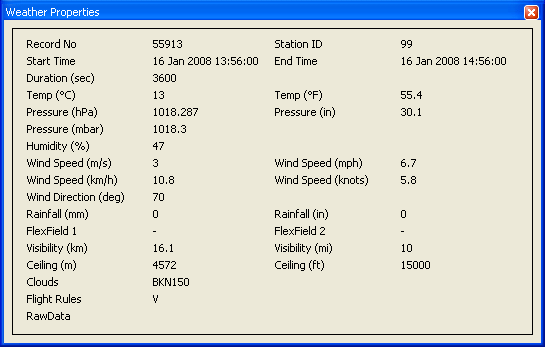
The Weather Properties dialogue showing the full detail of a single weather record
Exporting weather data
You can export selected weather records to an Excel workbook for further analysis and reporting.
To export weather data:
- In the Weather Browser, select the required data.
- Click Export.
A new Excel workbook opens, populated with the selected data. You can then use Excel's tools to format the data and produce reports.
You can also copy weather records to the clipboard and paste them into other applications.