


New article
Recently updated
Understanding weather data in ANOMS

Who is this article for?Noise analysts who want to understand the weather data ANOMS collects and how it is used.
Access to the ANOMS Noise Analyst Workbench is required.
ANOMS collects and displays weather data alongside your noise and operations data, allowing you to see the conditions under which any Noise Event was recorded.
Understanding weather data sources
ANOMS can collect and display weather data from several sources, including:
- Noise monitoring terminals (NMTs) fitted with weather stations
- METAR data feeds
- METEO data feeds
- NOAA data feeds
- ATIS data feeds
For example, a raw METAR feed record looks like this:
METAR EHAM 181055Z 28014KT 9999 -SHRA FEW016 BKN030 19/15 Q1005 NOSIG=Understanding weather data correlation
Weather records are correlated to Noise Events based on time, and only one weather record can be related to each Noise Event. This correlation relationship is reflected in display linking and hard-linked queries with the Noise Events Browser.
Note: For more information about correlation, see "Correlated vs uncorrelated records explained".
Using the Weather Browser
You can use the Weather Browser to:
- Display weather data for a specific time period
- Copy the weather data to the clipboard or to an Excel worksheet
- Print weather records
Opening the Weather Browser
To open the Weather Browser:
- Do one of the following:
- In the Browsers menu, point to Weather, then click Open Weather.
- On the main toolbar, click the Weather Browser button.
- Populate the Weather Browser window with a query.
Note: For more information about creating queries, see "Creating a query with Load Filtered Data".
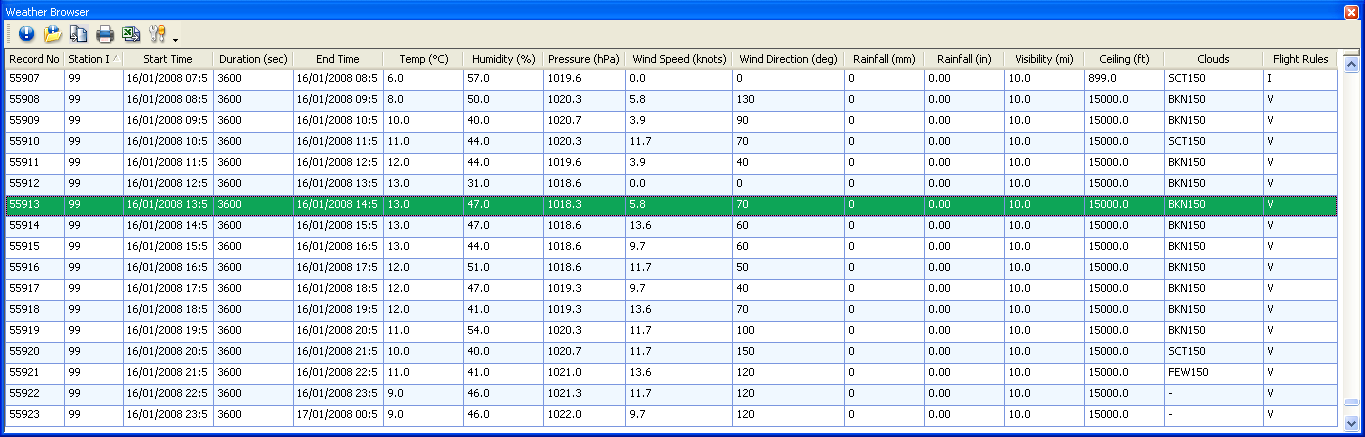
The Weather Browser displaying hourly weather records for one station
Viewing weather data fields
The Weather Browser lists one row per weather record, covering temperature, humidity, pressure, wind, rainfall, visibility and cloud ceiling. You can view a record's full details and export weather data as needed.
Note: For detailed information about each field in the Weather Browser, refer to the Weather Browser field reference documentation.