


New article
Recently updated
Understanding selection zones

Who is this article for?Noise analysts who want to understand zone-based flight monitoring.
Access to the ANOMS Noise Analyst Workbench is required.
Selection zones are user-drawn polygon volumes of airspace with configurable floor and ceiling that let you analyse air traffic against defined areas.
Understanding how selection zones work
A selection zone is defined as a volume of space with a user-configured floor and ceiling. Any track that touches the boundary of the volume, crosses into or out of the volume, or is fully contained within it, is counted as intersecting the selection zone.
Selection zones differ from the standard Track Filtering function, which only allows a cylinder or hemisphere shape and only filters flights that went inside the shape. Selection zones can be any polygon, and can also find tracks that did not go through the zone.
Selection zones can be set as Active, in which case ANOMS automatically checks flight tracks against them as part of overnight processing. You can then quickly find tracks using the Query Generator and the Selection Zones relations in the ANOMS database.
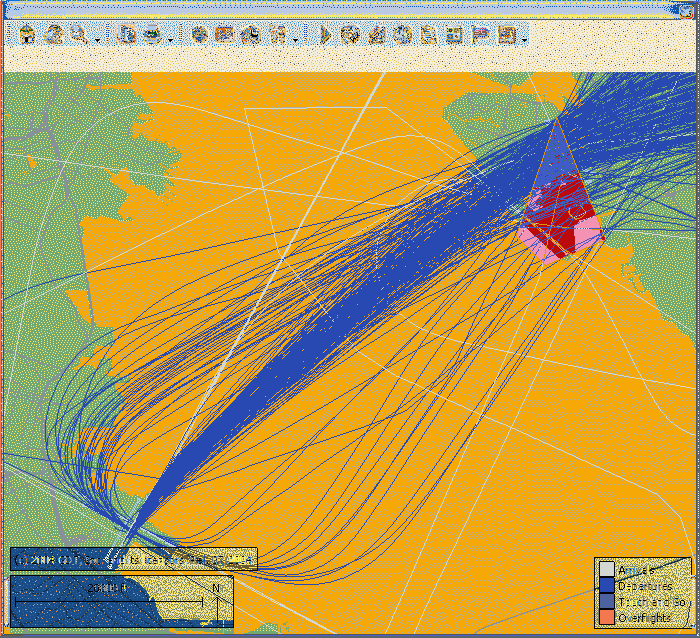
A selection zone on the Map Browser with the filtered flight tracks that intersect it
Understanding what is recorded
Flights that intersect a selection zone are detected and reported with detailed information:
- Time of intersection of the selection zone
- Type of intersection, and altitude at the time
- The name of the zone or zones intersected
- Flight operation details
Operations that intersected zones can be filtered in a query using the type of intersection:
Code | Meaning |
I | The flight flew into the zone |
O | The flight flew out of the zone |
C | The flight was contained in the zone |
Using selection zones
You can use selection zones to define restricted airspace, display it on the map, and filter or report on the flights that intersected it. Available actions include:
- Create a selection zone
- Use selection zones to filter flight tracks
- Run Selection Zone Analysis
- Manage selection zones in folders
- Edit selection zones
- Export selection zones