


New article
Recently updated
Running gate and corridor analysis

Who is this article for?Noise analysts who need gate and corridor results for historical flights.
Access to the ANOMS Noise Analyst Workbench is required.
Gate and corridor analysis matches operations against your gates and corridors and writes the results to the database, normally running overnight but available for manual execution when testing new configurations.
Understanding gate and corridor analysis
Gate and corridor analysis matches operations against your gates and corridors and writes the results to the database. It normally runs overnight, but you can run it manually to test the impact of a new gate or corridor.
Note: For a gate or corridor to qualify for analysis, it must be active.
Note: If you have not run gate and corridor analysis, or have not saved the gate or corridor, then running a query against it returns the message "No records were selected".
Running the analysis manually
To run the analysis manually:
- On the Input menu, select Analyze Gate and Corridor Activity.
- Complete one or more of the following options in the Gate/Corridor Analysis Report dialogue box:
- Select the Print statistics check box
- Select the Single gate to process check box, then select a gate name
- Select the Single corridor to process check box, then select a corridor name from the list
- Select the Single operation to process check box, then enter an operation number (if you select this option, you cannot select gates or corridors)
- Select the Process overflights check box
- In Start Date, type or select a date.
- In End Date, type or select a date.
- Click OK.
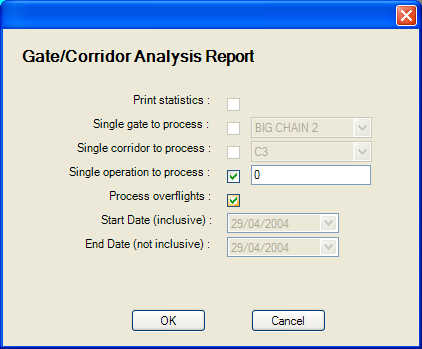
The Gate/Corridor Analysis Report dialogue box
Note: The process creates database records that relate operation numbers to gate names. These records can then be accessed using queries in the Query Generator — see the article Reporting gate penetrations with the Query Generator.